
A few months ago, one of my colleagues asked an AI assistant a simple question about one of our products. The answer was not exactly wrong, but it was very general, and some of the information was outdated. The source of information in many cases was not our website, AI knew more about us from other sources than our own website.
Our pages looked fine in the browser, and Google was indexing them without any obvious problems.
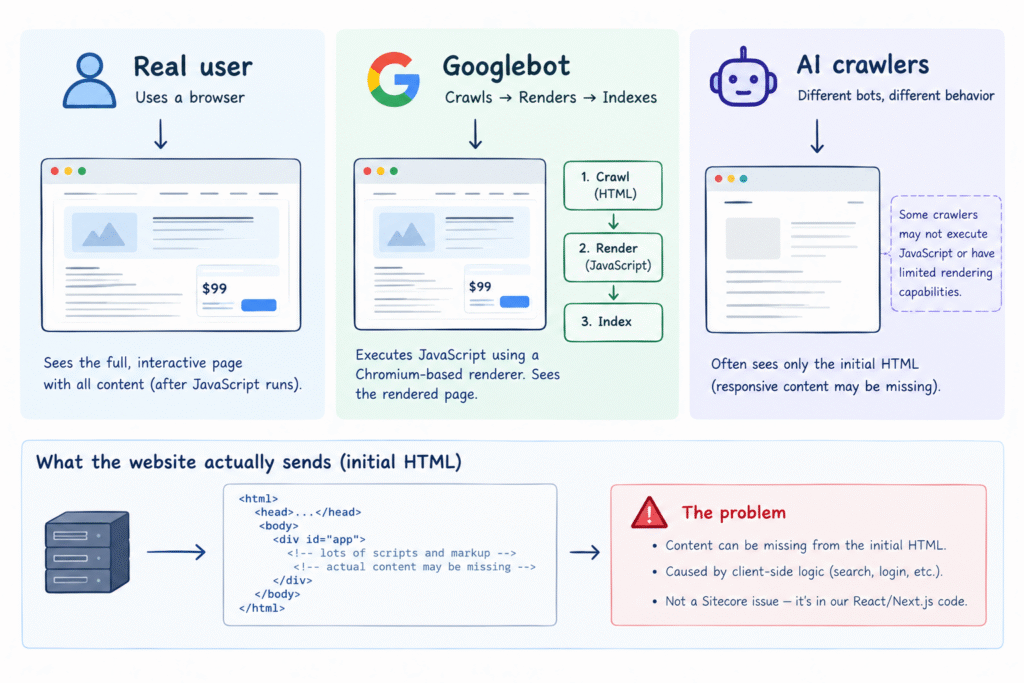
What is an AI bot actually getting when it visits our website?
We use a headless Sitecore setup with a Next.js frontend. Modern frameworks like Next.js give us fast, interactive experiences, but important content can sometimes depend on JavaScript running in the browser.
Google can render JavaScript because it uses a three stage process of crawling, rendering and indexing to document, but different AI crawlers and automated clients can behave differently. So a page that works perfectly in a browser or even for Google does not necessarily mean every crawler will be able to retrieve the same content. So we wanted to understand
- What a real user sees,
- What Google can render,
- What a crawler sees in the initial HTML response, and
- What a particular AI agent is able to retrieve or render
How we checked?
We requested several pages using a crawler-like HTTP request, without executing JavaScript, and inspected the initial HTML response. We also opened the same pages with JavaScript disabled and checked page source.
The result was surprising, there was plenty of markup and JavaScript, but much of the actual content was missing from the initial HTML.
What we found
After realizing the problem, we checked our implementation and realized that this was not a Sitecore problem or Next.js problem. The content was available in the CMS, and Next.js was capable of rendering it on the server. The problem was in some of our React/application logic.
Our main layout was waiting for both the search client and user session before rendering the page content. Both were primarily becoming ready in the browser. On the server, the condition was false and the page body was not rendered.
if searchClient is ready and session is known:
    render pageContent

// otherwise:
// page body is not rendered
This was the biggest issue we found. We changed this so normal page content renders independently of search and login. Only components that actually need those services wait for them.
Credit where due: My team member Danish Khurshid worked on the actual code analysis and changes to find and fix these issues.
Some of the other issues we fixed were
1. Rich Text Was Wrapped in <p> instead of <div>
Several components were rendering CMS rich text inside a <p> tag but rich text can contain paragraphs, lists, headings and other block-level elements. This could result in invalid structures such as a <p> inside another <p>, which can contribute to server/client rendering differences and React hydration problems. We changed the wrapper where appropriate:
// before
RichText(field = description, tag = "p")

// after
RichText(field = description, tag = "div")
2. Product prices were loaded Only in the Browser
Product prices were coming from a client-side request after the page loaded. For clients that did not execute that JavaScript, the initial HTML contained no price. We wanted all AI crawlers to see our latest product prices so we fixed it by sending the price in the initial response.
What We Learned
The biggest lesson for us was simple, don’t assume that because a page looks correct in a browser, every automated client will see the same thing.
For a headless website, the initial HTML is worth testing. If you are running a React or Next.js site, try opening an important page with JavaScript disabled. Then inspect the raw HTML and check whether the important content is actually there.
Related posts
How Sitecore Scrunch Fits Into the Modern Web Stack: Sitecore Scrunch Demo Takeaways (Part 2)