
In the previous blog post, I explained how to calculate the size of media library and sub-items. Once you know the size you can plan to export Sitecore Media Library items to disk in one go or folder by folder depending on the Size. In this blog post we will continue our discussion and I will share a fully working code example to show how we can export them to disk which can then be downloaded and used as needed.
Why Export Media Library Files?
There are many scenarios where exporting Sitecore media assets can be useful
- Migrating to a different CMS or DAM.
- Creating a local backup of image/media content.
- Performing bulk edits outside of Sitecore and re-importing.
- Archiving static content for legacy projects.
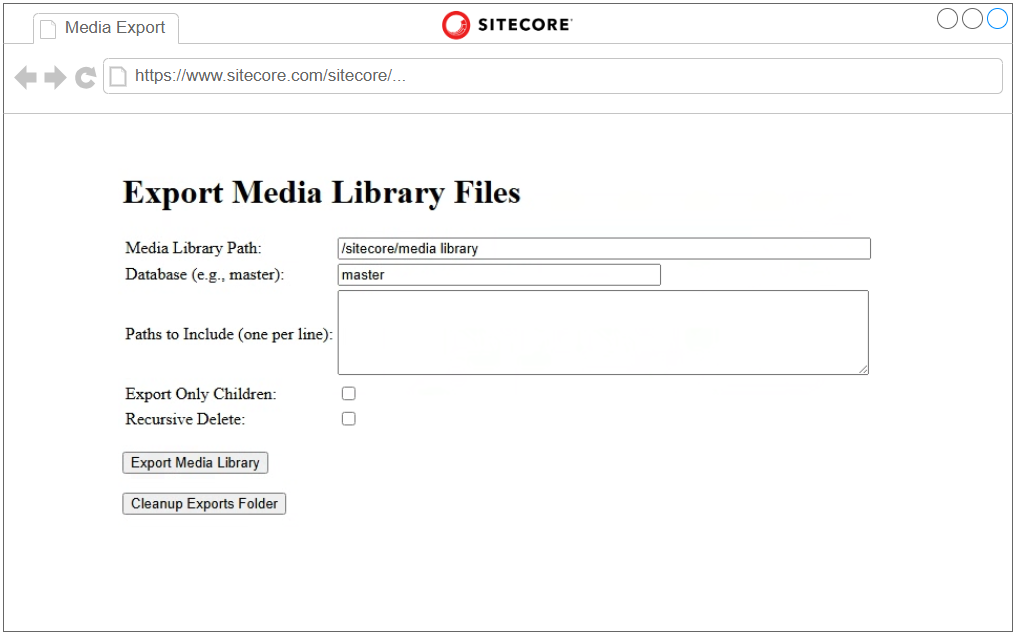
The code snippet provided offers a functional, UI-based approach that allows users to export specific media items from Sitecore using a defined path, optionally filtering by child items, and cleaning up export directories.
What the Script Does
This tool is designed to:
- Input the Media Library path
- Specify the Sitecore database (default:
master) - List include paths to narrow export scope
- Choose whether to export only direct children
- Opt to recursively delete the export folder
ASP.NET Example to Export Sitecore Media Library Assets to Disk
You will need to have Sitecore admin access to run this. You can also use code-behind i.e. but that require deployment where-as this method gives you more flexibility.
<%@ Page Language="C#" AutoEventWireup="true" Inherits="System.Web.UI.Page" %>

<%@ Import Namespace="Sitecore.Data" %>
<%@ Import Namespace="Sitecore.Data.Items" %>
<%@ Import Namespace="Sitecore.Resources.Media" %>
<%@ Import Namespace="Sitecore.Configuration" %>
<%@ Import Namespace="System.Collections.Generic" %>
<%@ Import Namespace="System.IO" %>
<!DOCTYPE html>
<html lang="en">
<head>
    <meta charset="UTF-8" />
    <title>Sitecore Media Export</title>
</head>
<body>
    <h1>Export Media Library Files</h1>
    <form id="form1" runat="server">
        <table>
            <tr>
                <td>
                    <label for="mediaPath">Media Library Path:</label>
                </td>
                <td>
                    <asp:TextBox ID="mediaPathTextBox" Width="500px" Text="/sitecore/media library" runat="server"></asp:TextBox>
                </td>
            </tr>
            <tr>
                <td>
                    <label for="database">Database (e.g., master):</label>
                </td>
                <td>
                    <asp:TextBox ID="databaseTextBox" Width="300px" Text="master" runat="server"></asp:TextBox>
                </td>
            </tr>
            <tr>
                <td>
                    <label for="includePaths">Paths to Include (one per line):</label>
                </td>
                <td>
                    <asp:TextBox ID="includePathsTextBox" TextMode="MultiLine" Rows="5" Width="500px" runat="server"></asp:TextBox>
                </td>
            </tr>
            <tr>
                <td>
                    <label for="exportChildrenOnly">Export Only Children:</label>
                </td>
                <td>
                    <asp:CheckBox ID="exportChildrenOnlyCheckBox" runat="server" />
                </td>
            </tr>
            <tr>
                <td>
                    <label for="recursiveDelete">Recursive Delete:</label>
                </td>
                <td>
                    <asp:CheckBox ID="recursiveDeleteCheckBox" runat="server" />
                </td>
            </tr>
        </table>
        <br />
        <button type="submit" runat="server" onserverclick="ExportMediaLibrary_Click">Export Media Library</button>
        <br />
        <br />
        <button type="button" runat="server" onserverclick="CleanupExportsFolder_Click">Cleanup Exports Folder</button>
    </form>
    <br />
    <asp:Literal ID="ltResult" runat="server"></asp:Literal>
</body>
</html>
<script runat="server">
    protected void CleanupExportsFolder_Click(object sender, EventArgs e)
    {
        try
        {
            string exportDirectory = Server.MapPath("/App_Data/Export/MediaLibrary");
            bool recursiveDelete = recursiveDeleteCheckBox.Checked;

            if (Directory.Exists(exportDirectory))
            {
                if (recursiveDelete)
                {
                    Directory.Delete(exportDirectory, true);
                    ltResult.Text = "<p class='success'>Exports folder and all contents deleted recursively.</p>";
                }
                else
                {
                    string[] files = Directory.GetFiles(exportDirectory);
                    foreach (string file in files)
                    {
                        File.Delete(file);
                    }
                    ltResult.Text = "<p class='success'>Exports folder cleaned up (files only).</p>";
                }
            }
            else
            {
                ltResult.Text = "<p class='error'>Exports folder does not exist.</p>";
            }
        }
        catch (Exception ex)
        {
            ltResult.Text = "<p class='error'>An error occurred while cleaning up the exports folder: " + ex.Message + "</p>";
        }
    }

    protected void ExportMediaLibrary_Click(object sender, EventArgs e)
    {
        string mediaPath = mediaPathTextBox.Text.Trim();
        string databaseName = databaseTextBox.Text.Trim();
        string includePathsRaw = includePathsTextBox.Text;
        bool exportChildrenOnly = exportChildrenOnlyCheckBox.Checked;

        List<string> includePaths = new List<string>();
        if (!string.IsNullOrWhiteSpace(includePathsRaw))
        {
            includePaths.AddRange(includePathsRaw.Split(new[] { '\r', '\n' }, StringSplitOptions.RemoveEmptyEntries));
        }

        if (string.IsNullOrEmpty(mediaPath) || string.IsNullOrEmpty(databaseName))
        {
            ltResult.Text = "<p class='error'>Please provide Media Library Path and Database.</p>";
            return;
        }

        if (includePaths.Count == 0)
        {
            ltResult.Text = "<p class='error'>Please specify at least one path to include.</p>";
            return;
        }

        Database db = Factory.GetDatabase(databaseName);
        Item rootMediaItem = db.GetItem(mediaPath);

        if (rootMediaItem == null)
        {
            ltResult.Text = string.Format("<p class='error'>Media Library path not found: {0}</p>", mediaPath);
            return;
        }

        try
        {
            ExportMediaItems(rootMediaItem, includePaths, exportChildrenOnly);
            ltResult.Text += "<p class='success'>Export completed.</p>";
        }
        catch (Exception ex)
        {
            ltResult.Text = string.Format("<p class='error'>An error occurred: {0}</p>", ex.Message);
        }
    }

    private void ExportMediaItems(Item rootItem, List<string> includePaths, bool exportChildrenOnly)
    {
        string exportDirectory = Server.MapPath("/App_Data/Export/MediaLibrary");

        if (!Directory.Exists(exportDirectory))
        {
            Directory.CreateDirectory(exportDirectory);
        }

        IEnumerable<Item> itemsToExport;
        if (exportChildrenOnly)
            itemsToExport = rootItem.Children;
        else
            itemsToExport = rootItem.Axes.GetDescendants();

        foreach (Item childItem in itemsToExport)
        {
            if (childItem.TemplateName.ToLower().Contains("folder"))
                continue;

            if (!includePaths.Exists(path => childItem.Paths.Path.StartsWith(path, StringComparison.OrdinalIgnoreCase)))
                continue;

            try
            {
                ExportMediaItem(childItem, exportDirectory);
            }
            catch (Exception ex)
            {
                ltResult.Text += string.Format("<p class='error'>Failed to export {0}: {1}</p>", childItem.Paths.Path, ex.Message);
            }
        }
    }

    private void ExportMediaItem(Item mediaItem, string exportDirectory)
    {
        var media = new MediaItem(mediaItem);
        string mediaPath = mediaItem.Paths.Path.Substring(mediaItem.Paths.Path.IndexOf("/media library") + 1);
        string relativePath = mediaPath.Replace("Media Library", string.Empty).Trim('/');
        string folderPath = Path.Combine(exportDirectory, Path.GetDirectoryName(relativePath));

        if (!Directory.Exists(folderPath))
        {
            Directory.CreateDirectory(folderPath);
        }

        string fileName = mediaItem.Name;
        string fileExtension = media.Extension;

        if (string.IsNullOrEmpty(fileExtension))
        {
            fileExtension = "na";
        }

        string fullFilePath = Path.Combine(folderPath, string.Format("{0}.{1}", fileName, fileExtension));

        if (File.Exists(fullFilePath))
        {
            return;
        }

        using (Stream fileStream = media.GetMediaStream())
        {
            if (fileStream != null)
            {
                using (var file = new FileStream(fullFilePath, FileMode.Create, FileAccess.Write))
                {
                    fileStream.CopyTo(file);
                }
                ltResult.Text += string.Format("<p class='success'>Exported: {0}</p>", fullFilePath);
            }
            else
            {
                ltResult.Text += string.Format("<p class='error'>Failed to export (no stream): {0}</p>", fullFilePath);
            }
        }
    }
</script>
GitHub Code Link: https://github.com/zaheer-tariq/Sitecore-Blog-Gists/blob/main/Pages/Export/ExportMedia.aspx
How to upload and test this ASPX page
Please check this post on how to upload and test this page
https://sitecore.zaheertariq.com/2025/06/sitecore-upload-and-test-aspx-page-with-custom-logic/
How to download exported files from Server
If you have direct access to the server you can directly access it zip and download (copy-paste via Windows remote desktop). However if you have limited access like I did you can use Sitecore Package Designer.
Please check this blog post with detailed steps on how to do it
https://sitecore.zaheertariq.com/2025/06/download-folder-from-sitecore-without-server-access/
HashTags
#Sitecore #SitecoreTips #SitecoreMediaLibrary #CMSDevelopment #ASPNet #WebForms #SitecoreExport #MediaExport #ContentMigration #SitecorePackage #SitecoreDevelopment
Hi, will it be possible to calculate a size and download files, in case, if media items stored in Azure Blob and referenced in Sitecore?
Hi,
I have not tested it with Azure blog storage, it will probably depend on how they are referenced in Sitecore.