
The Sitecore GraphQL Playground UI also called GraphQL IDE is a handy tool for developers working with Sitecore’s GraphQL APIs. It provides a clean, interactive interface for testing your GraphQL queries.
If you’ve ever used Sitecore’s GraphQL Playground UI, you might have run into an annoying problem: the tooltip/autocomplete gets stuck on the screen and refuses to go away. This is really annoying and blocks/hides some parts of the UI and does not go away until you refresh the whole page.
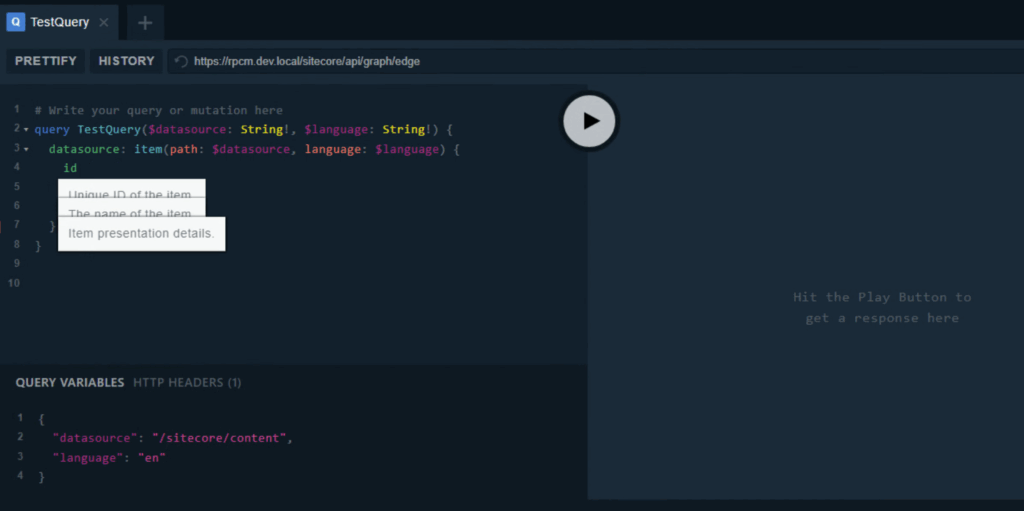
Sitecore’s GraphQL Playground Fix that really works
If you google you will find different posts suggesting different things but nothing concrete, to save time I found this chrome extension that you can simply install and get the issue fixed. Unfortunately this does not come up in Chrome web store even if you search by its exact name therefore I am copy pasting the exact link.
Install this chrome extension called GraphQL Playground Fixer to fix the issue
https://chromewebstore.google.com/detail/graphql-playground-fixer/gadhmegnpjolpnkfppehlmmlfpffoggo
Issue Background
The issue in Sitecore’s GraphQL Playground typically occurs when the autocomplete or type documentation pop-ups fail to disappear, remaining on the screen and blocking the editor. This is not a Sitecore-specific bug but an inherited problem from the underlying, unmaintained graphql-playground library.
This issue affects various platforms that use the outdated library, and recent reports suggest it is triggered by updates in modern web browsers, particularly Google Chrome versions 127 and newer. Other browsers like Firefox and Edge are reported to work as temporary alternatives.
The above fix will help with this issue
- Sitecore GraphQL IDE sticky tool top issue fixed
- Sitecore Playground autoComplete or Type Box doesn’t disappear fixed
- Sitecore’s GraphQL Playground documentation pop-ups fail to disappear issue fixed
Hashtags:
#Sitecore #GraphQL #GraphQLPlayground #WebDevelopment #DevTools #ChromeExtension #BugFix #DeveloperTips #SitecoreDevelopment #FrontendDev