
Recently, our content team noticed something very interesting while working in Sitecore content editor, the item version created time shown under the Versions dropdown didn’t match their local time.
For example, when a content author in the U.S. updated a page at 2:54 PM ET, Sitecore displayed the modification time as 6:50 PM, without showing any time zone indicator. This caused some confusion since the team expected to see the version timestamp in their own local time.
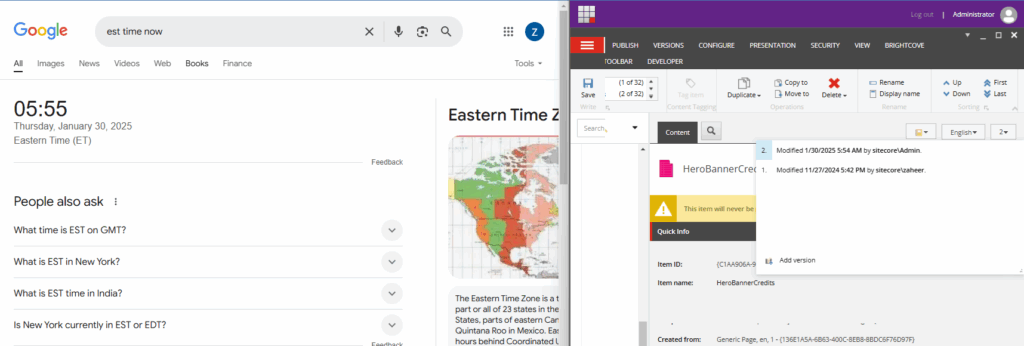
After reaching out to Sitecore Support, we learned that this behavior is controlled by the Server Time Zone setting in the sitecore.config file. This configuration determines how the system converts UTC time into the server’s local time zone.
If the server is set to a different time zone than where your team is based, the times displayed in Sitecore (like version history or workflow timestamps) will appear off. Adjusting the Server Time Zone in the configuration file can align it better with your content team’s location.
Sitecore config patch to fix Time Zone mismatch
<?xml version="1.0" encoding="utf-8" ?>
<configuration xmlns:patch="http://www.sitecore.net/xmlconfig/" xmlns:set="http://www.sitecore.net/xmlconfig/set/" xmlns:role="http://www.sitecore.net/xmlconfig/role/" >
	<sitecore role:require="Standalone or ContentManagement">
		<settings>
			<setting name="ServerTimeZone" set:value="Eastern Standard Time" />
		</settings>
	</sitecore>
</configuration>
Github Gist link: https://github.com/zaheer-tariq/Sitecore-Blog-Gists/blob/main/ConfigPatchFiles/ServerTimeZone.EST.config
You can use the above patch config file to fix the time zone mismatch
This fixed our issue, thanks to the awesome Sitecore support team. Happy Sitecoring 😊