
Recently, I had to switch my Next.js application from GraphQL to REST. Sitecore have a simple and straight forward article to do just that and apparently it is simply changing one environment variable but it turned out to be a nightmare to get it to work. I wanted to document my experience so it can save hours and hours for the community.
Solution first talks later
Following my own created solution first approach, here is what you need to do to get it to work. Please add/update the following in your environment file (.env or .env.local) which is location in the root folder of your application. Make sure to restart your application or redeploy for environment changes to take affect.
# Change this to blank or REST
FETCH_WITH=REST

# You will need to add this new environment variable for non-sxa
LAYOUT_SERVICE_CONFIGURATION_NAME=jss
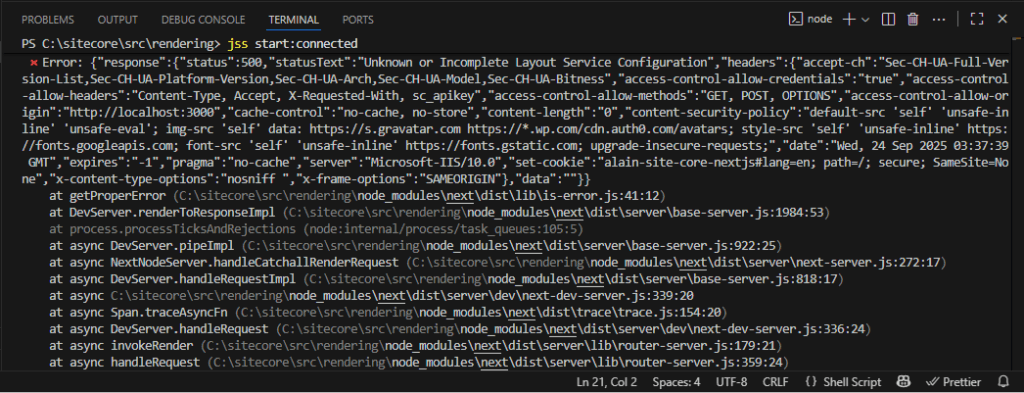
When switching between REST and GraphQL in Next.js JSS apps you may run into the dreaded “Unknown or Incomplete Layout Service Configuration” error. This often happens when converting a JSS application from GraphQL APIs to the REST Layout Service.
⨯ Error: {“response”:{“status”:500,”statusText”:”Unknown or Incomplete Layout Service Configuration”,”headers”:{“accept-ch”:”Sec-CH-UA-Full-Version-List,Sec-CH-UA-Platform-Version,Sec-CH-UA-Arch,Sec-CH-UA-Model,Sec-CH-UA-Bitness”,”access-control-allow-credentials”:”true”,”access-control-allow-headers”:”Content-Type, Accept, X-Requested-With, sc_apikey”,”access-control-allow-methods”:”GET, POST, OPTIONS”,”access-control-allow-origin”:”http://localhost:3000″,”cache-control”:”no-cache, no-store”,”content-length”:”0″,”content-security-policy”:”default-src ‘self’ ‘unsafe-inline’ ‘unsafe-eval’; img-src ‘self’ data: https://s.gravatar.com https://*.wp.com/cdn.auth0.com/avatars; style-src ‘self’ ‘unsafe-inline’ https://fonts.googleapis.com; font-src ‘self’ ‘unsafe-inline’ https://fonts.gstatic.com; upgrade-insecure-requests;”,”date”:”Wed, 24 Sep 2025 03:37:39 GMT”,”expires”:”-1″,”pragma”:”no-cache”,”server”:”Microsoft-IIS/10.0″,”set-cookie”:”alain-site-core-nextjs#lang=en; path=/; secure; SameSite=None”,”x-content-type-options”:”nosniff “,”x-frame-options”:”SAMEORIGIN”},”data”:””}}
at getProperError (C:\sitecore\src\rendering\node_modules\next\dist\lib\is-error.js:41:12)
at DevServer.renderToResponseImpl (C:\sitecore\src\rendering\node_modules\next\dist\server\base-server.js:1984:53)
at process.processTicksAndRejections (node:internal/process/task_queues:105:5)
at async DevServer.pipeImpl (C:\sitecore\src\rendering\node_modules\next\dist\server\base-server.js:922:25)
at async NextNodeServer.handleCatchallRenderRequest (C:\sitecore\src\rendering\node_modules\next\dist\server\next-server.js:272:17)
at async DevServer.handleRequestImpl (C:\sitecore\src\rendering\node_modules\next\dist\server\base-server.js:818:17)
at async C:\sitecore\src\rendering\node_modules\next\dist\server\dev\next-dev-server.js:339:20
at async Span.traceAsyncFn (C:\sitecore\src\rendering\node_modules\next\dist\trace\trace.js:154:20)
at async DevServer.handleRequest (C:\sitecore\src\rendering\node_modules\next\dist\server\dev\next-dev-server.js:336:24)
at async invokeRender (C:\sitecore\src\rendering\node_modules\next\dist\server\lib\router-server.js:179:21)
at async handleRequest (C:\sitecore\src\rendering\node_modules\next\dist\server\lib\router-server.js:359:24)
at async requestHandlerImpl (C:\sitecore\src\rendering\node_modules\next\dist\server\lib\router-server.js:383:13)
at async Server.requestListener (C:\sitecore\src\rendering\node_modules\next\dist\server\lib\start-server.js:141:13) {
page: ‘/_site_your-site-core-nextjs’
}
Layout Service Configurations
As a first step you need to ensure that your Layout service is working to figure out if this is a Sitecore or Next.js issue. For this you can simply create and test this URL in the browser. Make sure to replace placeholders with actual values
/sitecore/api/layout/render/jss?item={path}&sc_apikey={API_KEY}&sc_site={siteName}
If you see a valid json response from the above URL then it means that your Layout Service Configuration is correct. If this URL is not working make sure to
- Install the Sitecore Headless Services module on all Sitecore roles (CM and CD).
- Use
/sitecore/admin/showconfig.aspxto confirm that your configuration (jss) appears under<sitecore/layoutService/configurations>. - Sitecore must know about your JSS app to properly resolve routes and queries. Without it, you may see incomplete data or errors. Therefore make sure that you can see your jss app configurations using showconfig.aspx
Incorrect or Missing Configuration Name
When switching to REST, make sure your Next.js app have correct configuration and environment variables set.
- For a non-SXA JSS app, use
jss. - For an SXA app, use
sxa-jss. - Update your
layout-service-factory.ts(or equivalent) and set configurationName: ‘jss’
Note: you do not need to hardcode or change the code you can do this using below environment variables.
SITECORE_API_HOST=https://your-instance-domain
SITECORE_API_KEY={GUID}
SITECORE_SITE_NAME={yoursitename}

# Change this to blank or REST
FETCH_WITH=REST

# You will need to add this new environment variable for non-sxa website
LAYOUT_SERVICE_CONFIGURATION_NAME=jss- Ensure the API key exists in Sitecore and is published.
- In development, set API key’s CORS Origins and Allowed Sites to
*to avoid restrictions.
Final thoughts
The “Unknown or Incomplete Layout Service Configuration” error is caused by a mismatch between your Next.js setup and Sitecore’s Layout Service configuration. Check these areas to troubleshoot and fix the issue.
- Correct configuration name (
jssvs.sxa-jss) - Headless Services installed on all roles
- JSS app registered in Sitecore
- Proper environment variables and API keys
Make sure to stop and run your Next.js app again if you are running locally. For Vercel/Server deployments please update/add environment variables and re-deploy the application.
Hashtags:
#Sitecore, #SitecoreJSS, #HeadlessCMS, #NextJS, #SitecoreDevelopment, #SitecoreTips, #SitecoreTroubleshooting, #JSS, #SitecoreHeadless, #SitecoreErrors, #WebDevelopment, #Sitecore10